
AI you don't
have to trust.
WebKaya answers anything, like ChatGPT — and works over your private files with verified numbers and citations. It runs on your device by default. When you want frontier power, it runs in a confidential enclave your browser cryptographically verifies before a single prompt leaves. Don't take the privacy claim on faith: watch the meter.
Your best data is the data you can't upload
Patient records. Deal pipelines. Contracts. Source logs. Cloud AI needs that data to travel to someone else's servers — so the most valuable work never happens. WebKaya inverts it: the AI comes to your data, and every claim about where bytes went is measured or cryptographically verified, never promised.
Three tiers. One discipline. You choose the trade.
Every tier is labeled loudly in the product — a colored trust bar you can't miss, backed by a live egress meter.
On-device
defaultGemini Nano, WebLLM via WebGPU, or your own Ollama models. Files parsed, indexed, and analyzed in the browser. Nothing has anywhere to leak to.
Confidential cloud
attestedFrontier-class models inside a hardware enclave (AMD SEV-SNP + GPU TEE). Your browser verifies the enclave's chain of trust before any prompt is sent — the provider provably cannot read your data.
Cloud, your key
explicitBring your own Anthropic or OpenAI key when you choose to. Identifiers are masked locally first, the bar turns amber, and the meter counts every byte.
Don't trust the cloud.
Verify it — in your browser.
Every "private AI cloud" asks you to believe them. WebKaya ships its own dependency-free WebCrypto verifier: before your prompt leaves, the extension checks the enclave's hardware attestation against pinned roots of trust — in the page, where you can audit it.
The claim is precise and falsifiable: the inference provably runs the audited, reproducibly-built enclave release. If any check fails, nothing is sent.
Read the technical deep-dive →- SEV-SNP reporthardware attestation parsed & validated
- Chip signatureVCEK signs the report — ECDSA P-384
- AMD chain to pinned rootVCEK → ASK → ARK
- Code provenanceSigstore-signed release + transparency log
- Measurement equalityrunning enclave ≡ audited build
- Connection key bindingTLS key is sealed inside the enclave
- GPU TEENVIDIA-signed verdicts against a pinned CA
- Sealedonly now does the prompt leave
One workspace. Chat, agents, proof.
Ask anything in Chat — general questions answered directly, file questions answered with citations and verified numbers. Build reusable agents in the no-code studio. Every run leaves an audit trail.
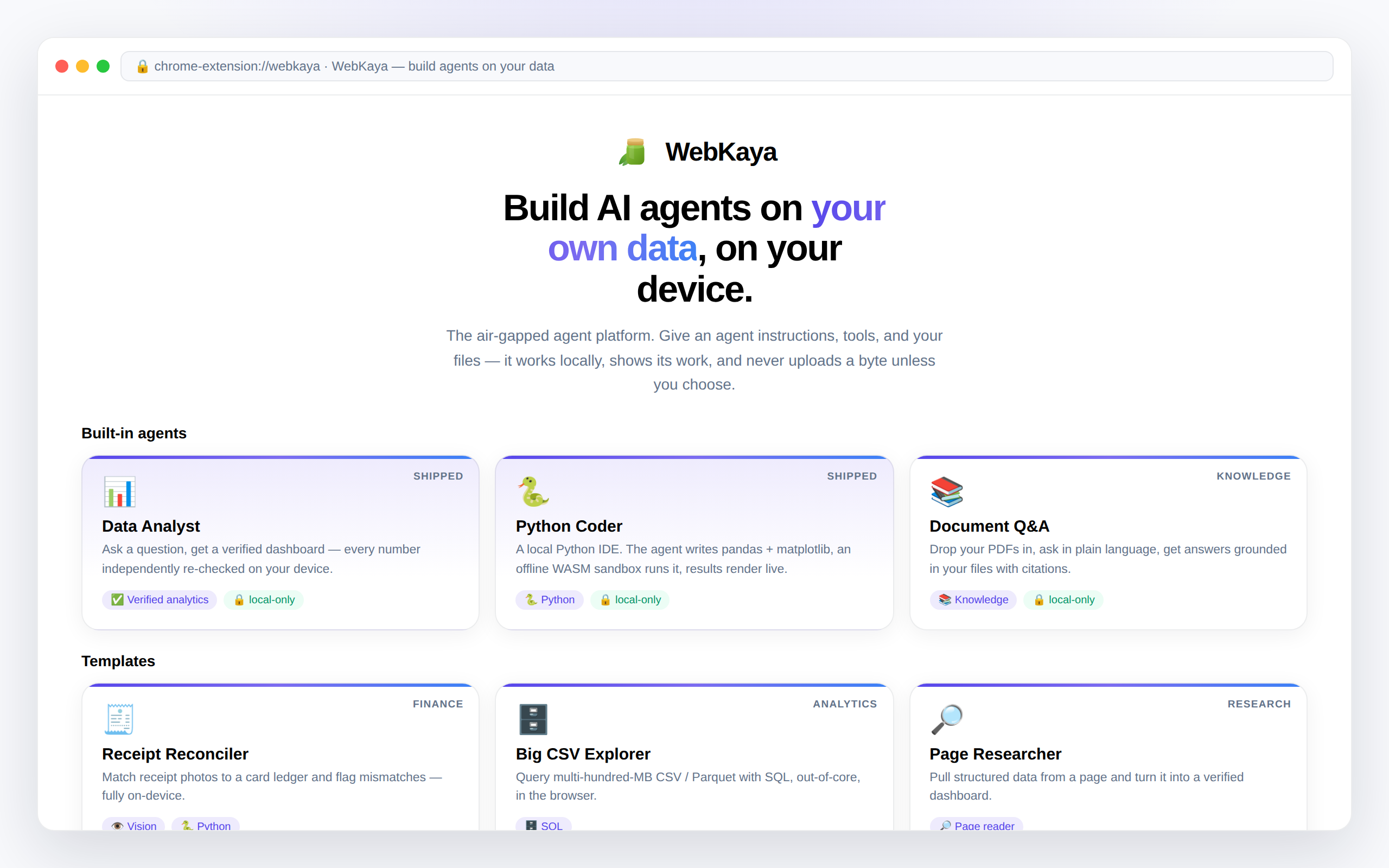
Everything you need to build a trustworthy agent
A build-your-own-agent studio with guardrails a cloud tool can't offer — because it all runs on the edge.
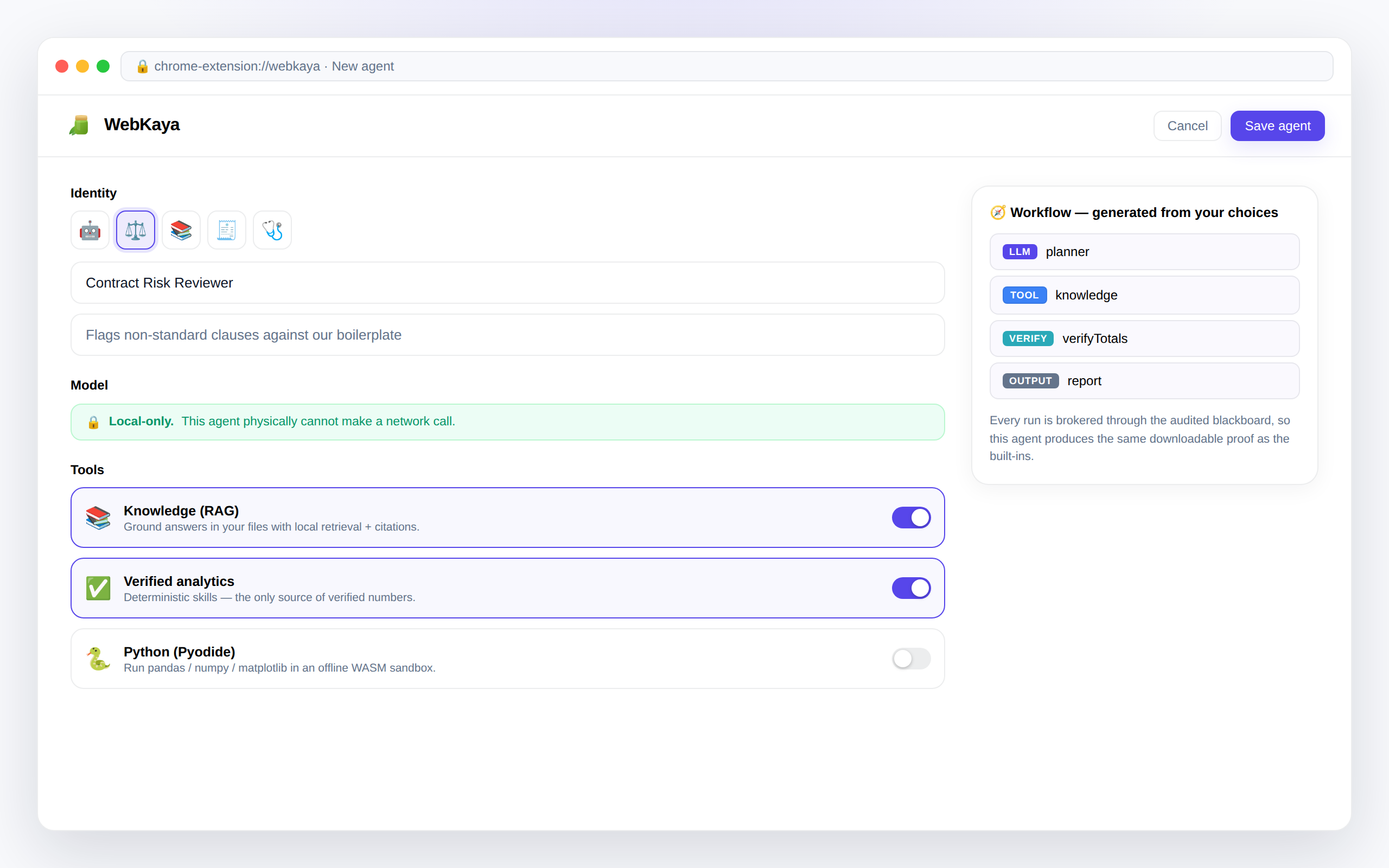
No-code agent builder
Name an agent, write its instructions, toggle its tools, attach its files. A governed workflow graph is generated behind the scenes.
Grounded in your files
PDFs, manuals, datasets — chunked, embedded, and indexed locally, so answers cite your sources with nothing uploaded.
Verified by construction
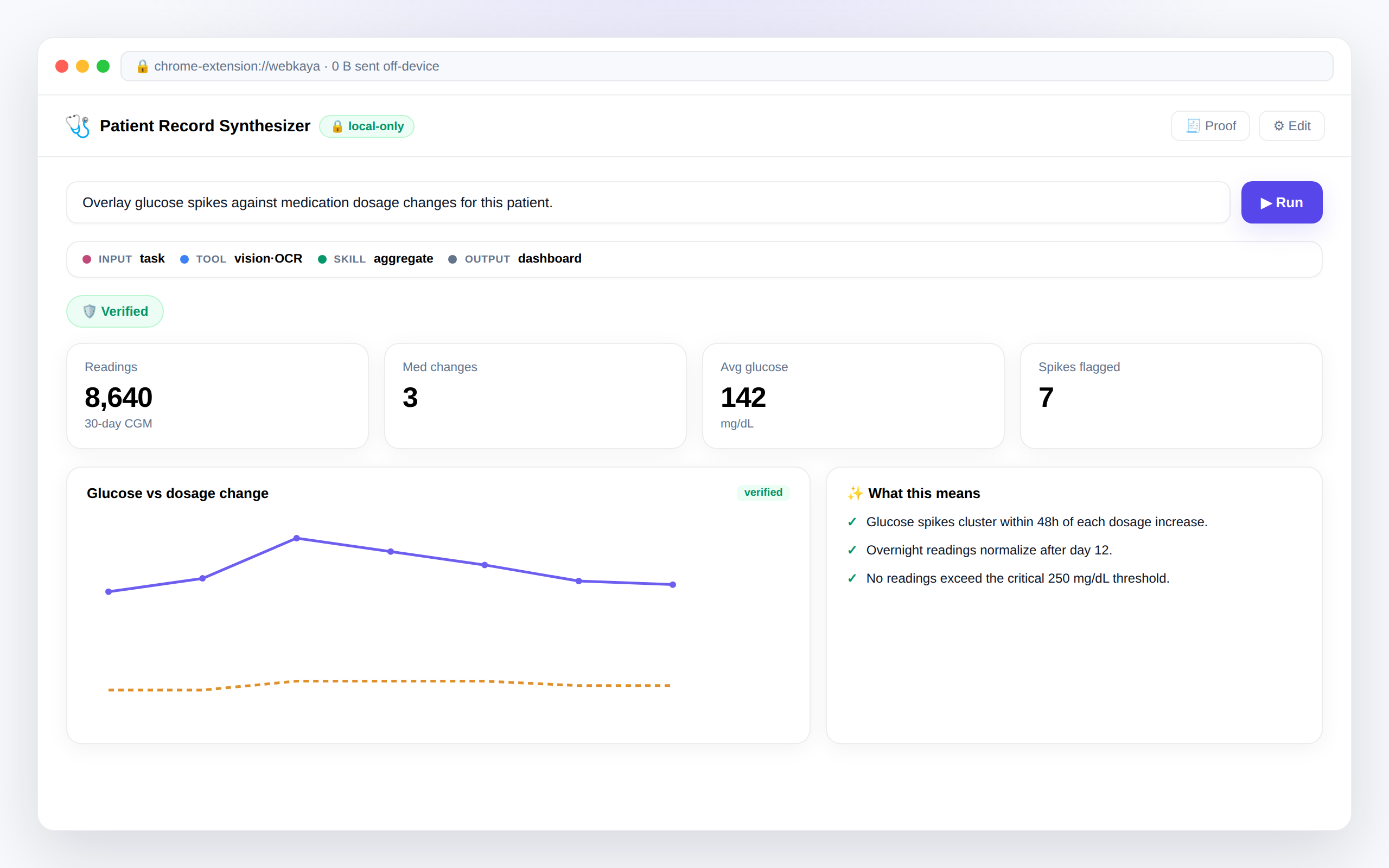
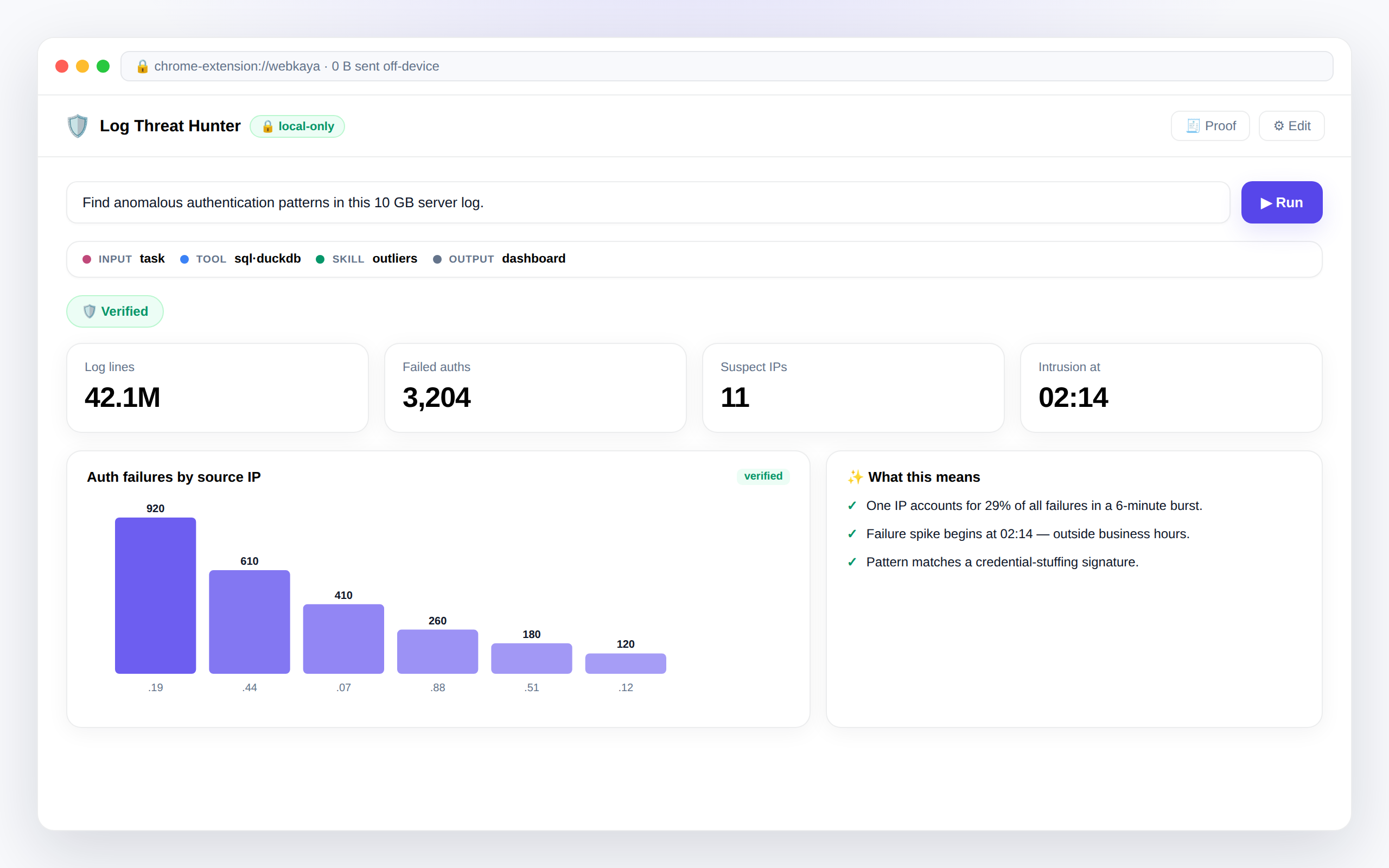
Every run is brokered through an audited blackboard. Deterministic skills independently re-check numbers — a weak model can plan, but can't emit a wrong figure.
A local tool registry
Offline Python (Pyodide), verified analytics, local retrieval, page reading, out-of-core SQL (DuckDB), and on-device OCR — each a toggle on your agent.
Multi-agent teams
Compose agents into a phased pipeline — researcher → analyst → verifier — running concurrently and in isolation on the same blackboard.
Share as a .wkagent
One portable file carries an agent's prompts, tools, and data schema — never your raw data. A teammate opens it and it recreates itself locally.
Downloadable proof
Every run produces one audit document: which step read and wrote what, with provenance — verified, computed, model, or retrieved — on every value.
Zero marginal cost
Local models loop for hours without an API budget. Escalate to the attested tier or your own cloud key only when you want frontier reasoning.
Local-only, enforced
Mark an agent local-only and it physically cannot make a network call — the runtime refuses to build a cloud provider. Not a promise; a property.
Ten agents you couldn't run in the cloud
Healthcare
Synthesize a patient's scanned records and CGM readings into one chart — under HIPAA, without uploading a byte.
Cybersecurity
Hunt anomalies in gigabytes of raw server logs locally — no network topology sent to a third-party model.
Finance & audit
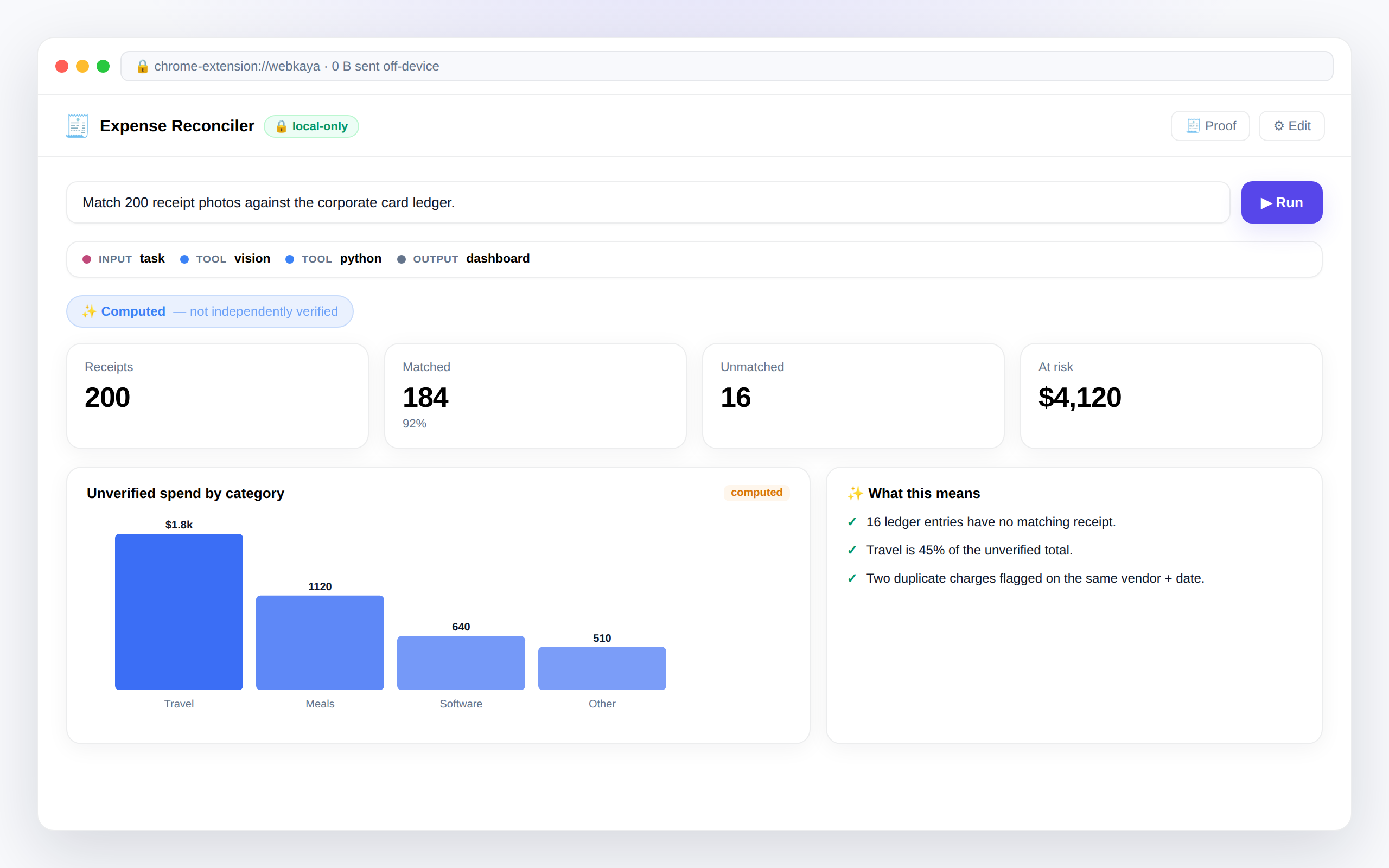
Reconcile hundreds of receipt photos against a card ledger and flag every unmatched entry automatically.
Legal
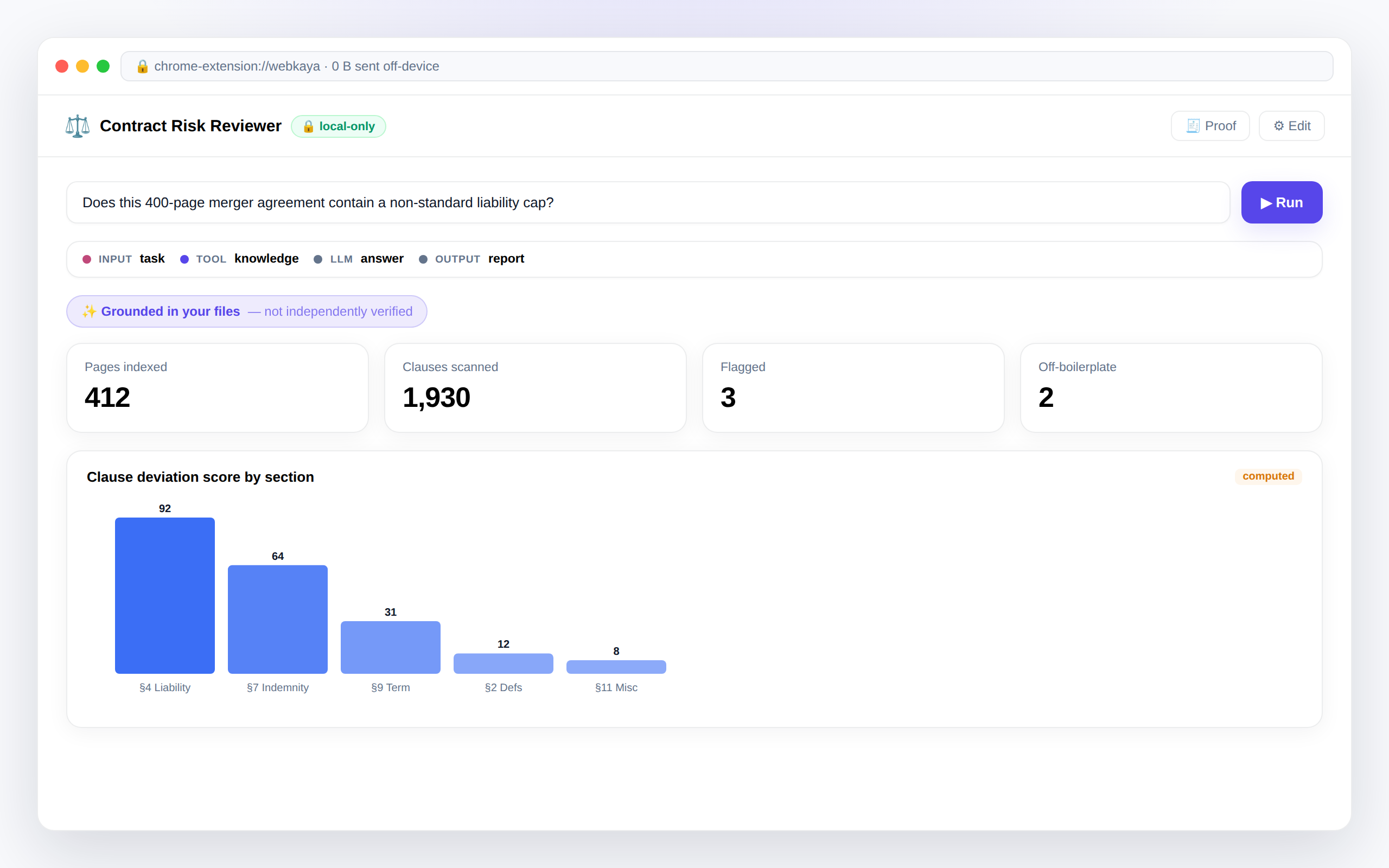
Scan a 400-page merger agreement for non-standard clauses, grounded and cited — behind the firm's firewall.
Human resources
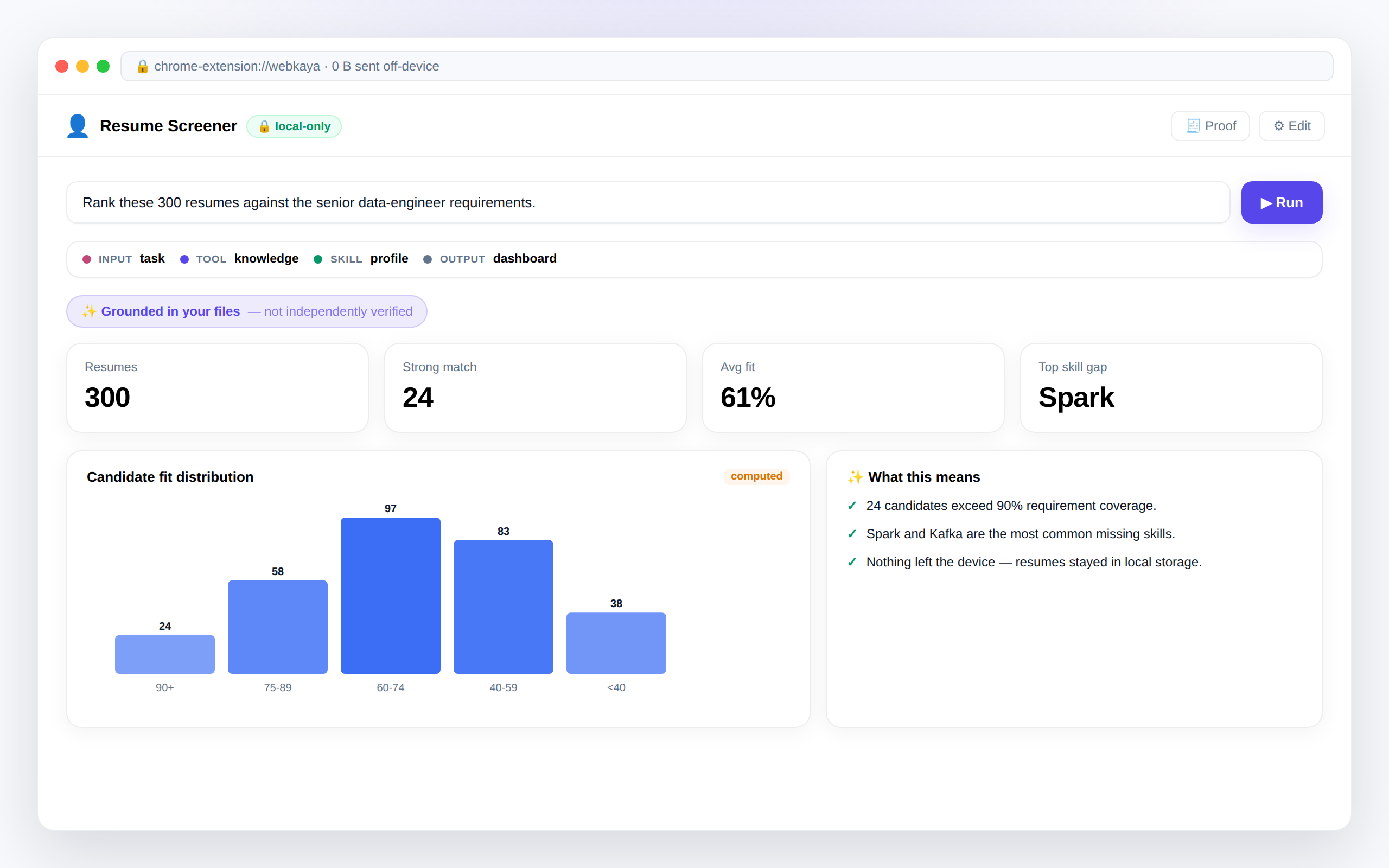
Rank hundreds of resumes against a role, indexed locally — no applicant PII leaves the recruiter's laptop.
Real estate
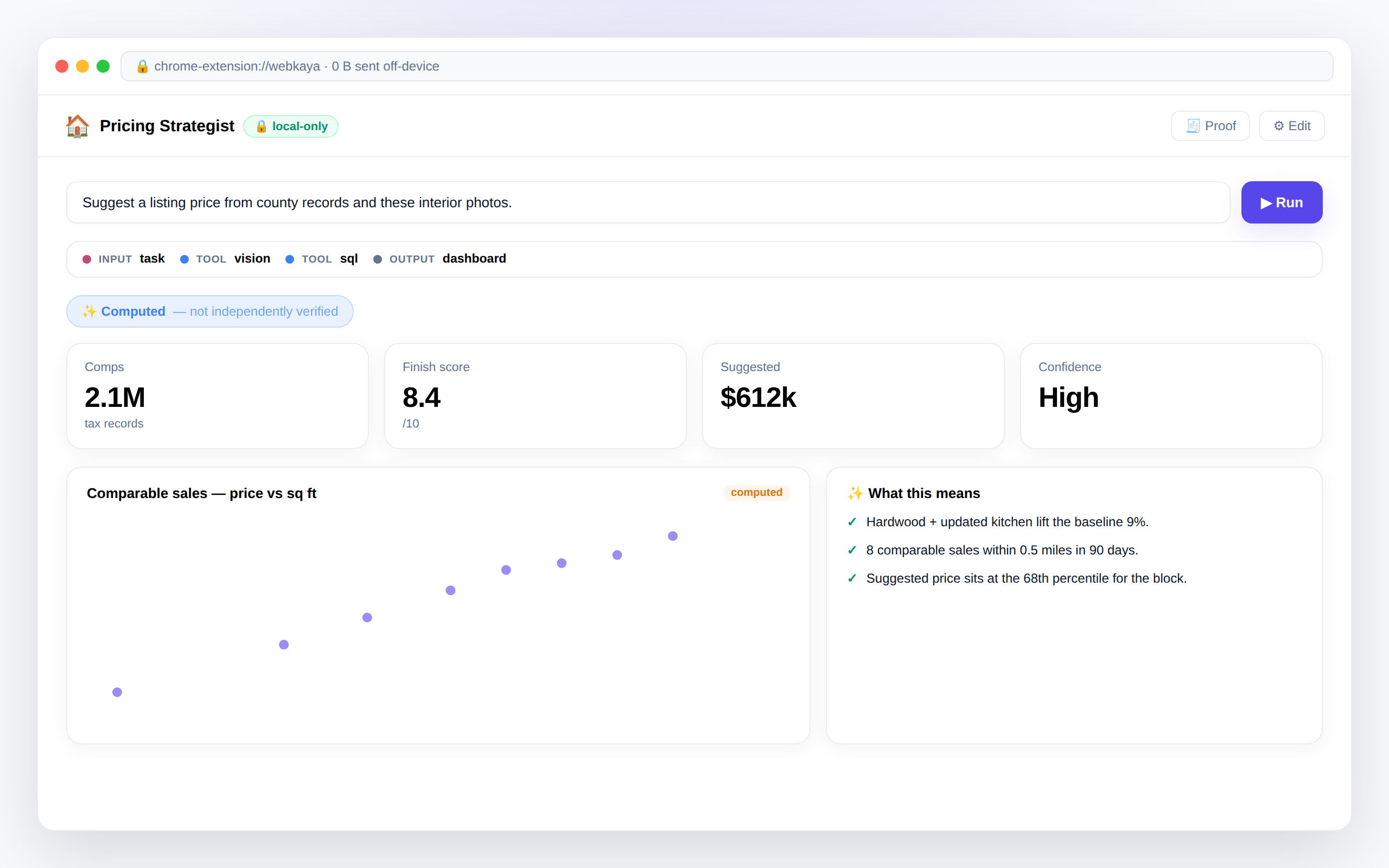
Blend millions of tax records with interior photos into a defensible listing-price recommendation.
Supply chain
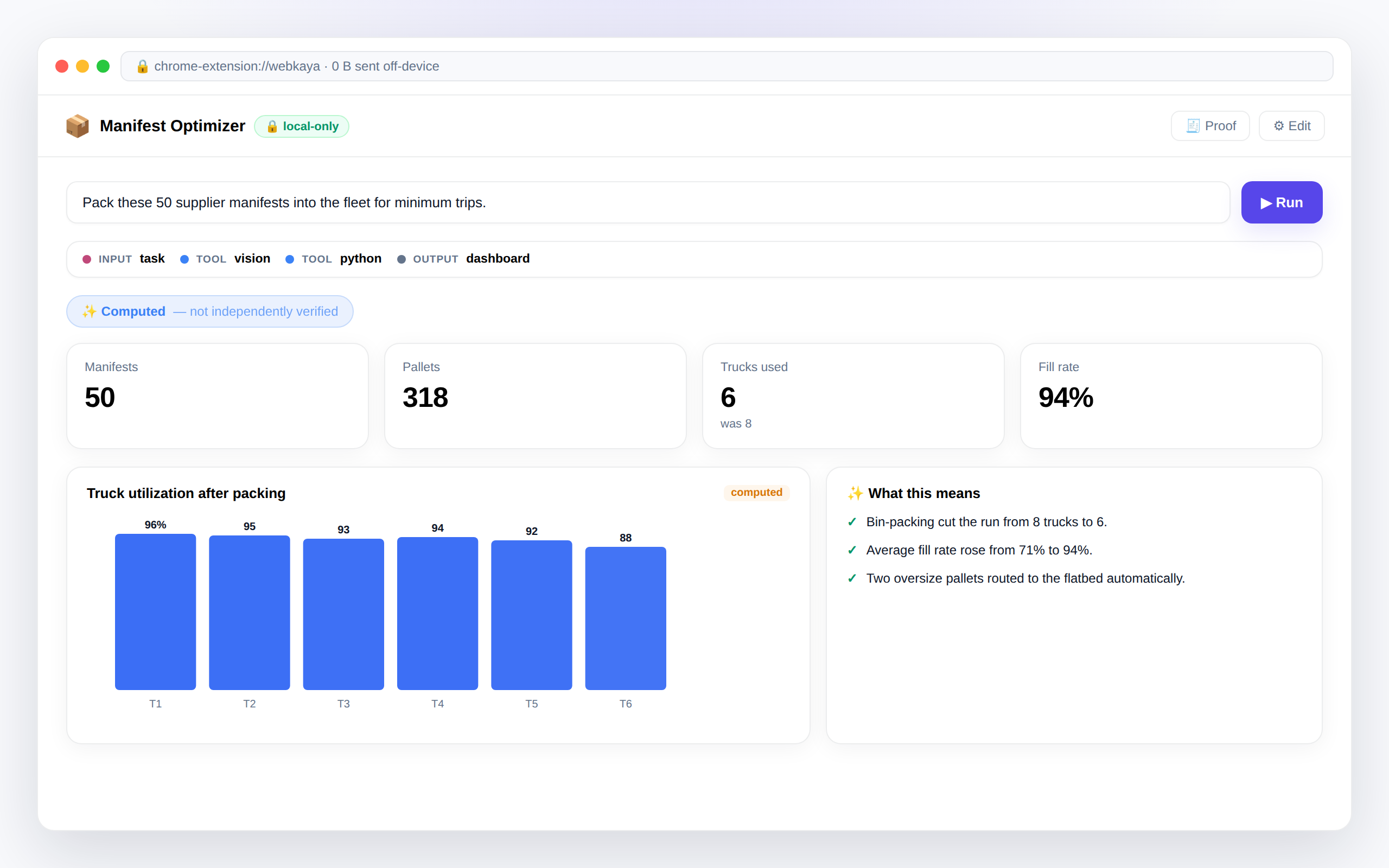
Read messy vendor manifests and bin-pack the fleet for the fewest trips — right on the warehouse laptop.
Marketing & SEO
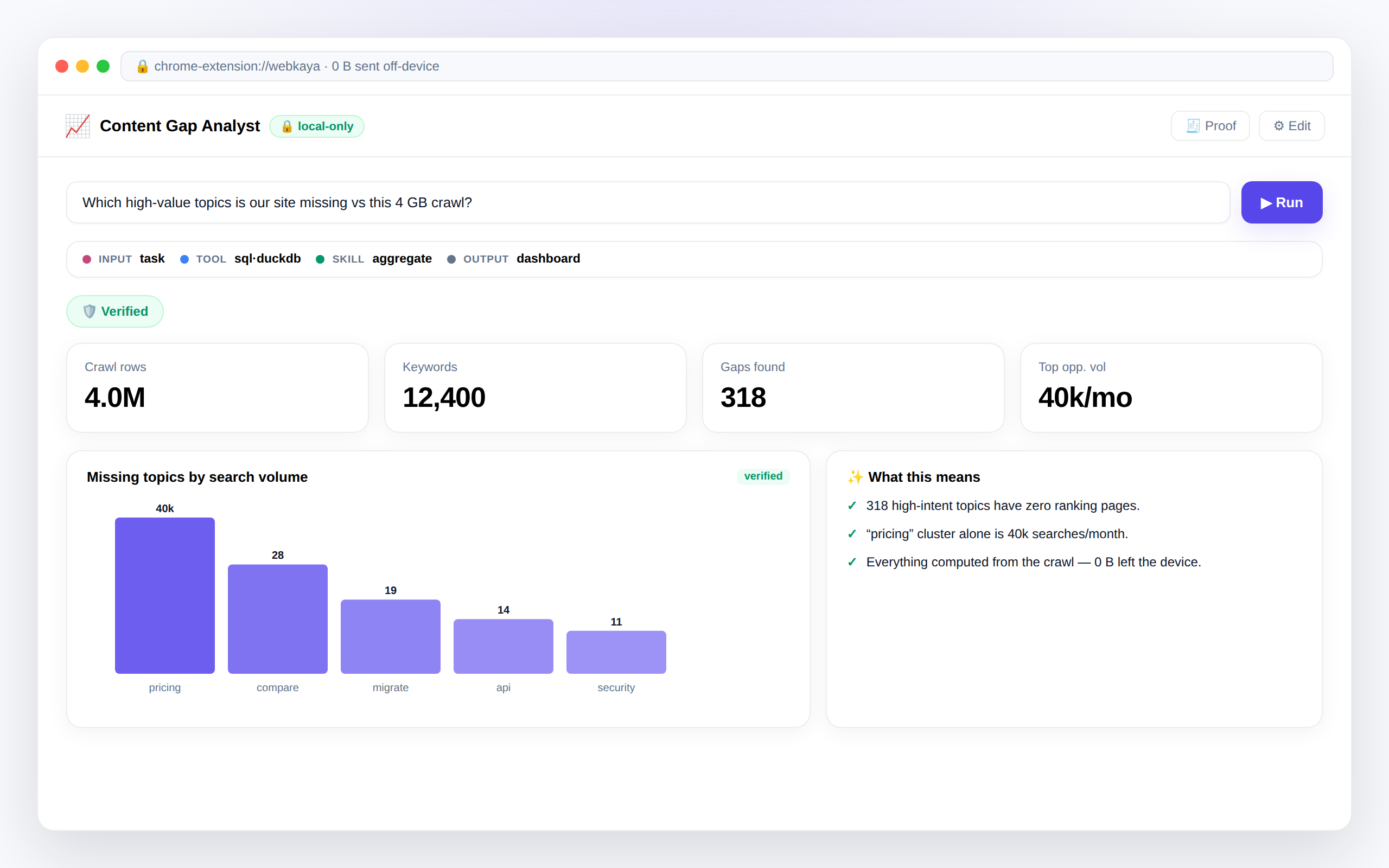
Crunch multi-gigabyte crawl exports to surface content gaps — without burning cloud API credits.
Food & beverage
Digitize a smeared clipboard inventory sheet and reconcile it against POS sales into a shrinkage report.
AI engineering
Stream a multi-GB eval log out-of-core and compute accuracy and failure breakdowns with local Python.
Ask. It runs where you chose. Trust the result.
Ask anything
Chat like any AI — or drop a CSV, receipt, or PDF and ask about it. No setup, no account, no code.
It runs on your terms
On-device by default; in a browser-verified enclave when you escalate. Retrieval, WASM compute, and independent re-checking — with the trust bar and meter always visible.
Trust the result
A clean answer, dashboard, or report — plus a downloadable proof of how every number was produced, and a meter proving what left (usually: nothing).
Not a promise — a property of the design
There are no WebKaya servers. Files are parsed in the browser, agents run on your device, and a live meter proves the egress. Even this website makes zero third-party requests.
- ✓ No servers, no analytics, no telemetry, no accounts
- ✓ On-device engines: Gemini Nano, WebLLM, or your own Ollama models
- ✓ Local-only agents physically cannot reach the network — enforced by the runtime
- ✓ Attested tier: the enclave's chain of trust is verified in-browser before anything is sent
- ✓ BYOK cloud gets locally-masked data behind an unmissable amber banner
- ✓ Shared
.wkagentfiles carry the agent's shape, never your raw data
Files → local sandbox → local AI. The internet path is severed — or sealed to a verified enclave.
Frequently asked
What exactly is WebKaya?
A private AI workspace in a Chrome extension. Chat answers anything, like ChatGPT — and works over your private files (CSVs, receipts, PDFs) with verified numbers and citations. Under the hood it's a full agent platform: ship-with-it agents sit alongside agents you build yourself, each with its own instructions, tools, and attached files.
Is my data really never uploaded?
By default, yes — WebKaya has no servers. Files are parsed in your browser, agents run on your device, and a live "0 B sent off-device" meter tracks every network channel — verifiable in DevTools. An agent marked local-only can't make a network call at all: the runtime refuses to build a cloud provider for it.
What is the confidential (attested) tier?
Frontier-class open models running inside a hardware-attested confidential VM (AMD SEV-SNP with GPU confidential computing). Before any prompt is sent, WebKaya's own WebCrypto verifier checks the enclave's chain of trust — chip signature, AMD certificate chain to a pinned root, Sigstore code provenance, measurement-vs-release equality, connection-key binding, and GPU TEE evidence. If verification fails, nothing is sent. You bring your own inference key.
Do I need an API key?
No. A built-in on-device model (Chrome's Gemini Nano where available, or WebLLM via WebGPU) works out of the box. You can point WebKaya at your own local Ollama models, add a Tinfoil key for the attested tier, or bring an Anthropic/OpenAI key — in which case data is masked locally first and the banner turns amber.
Do I have to build an agent to use it?
No. The front door is Chat: ask anything, or drop a file and ask about it. Agents, the builder, and the Advanced tools are an optional power layer for when you want a reusable specialist.
What does "verified numbers" mean?
Aggregations run on a deterministic analytics pipeline, and independent skills re-check the results before they're shown — the model narrates, but it cannot emit an unchecked figure. Every run's proof is downloadable as JSON.
Can I share an agent with my team?
Yes. Export any agent as a .wkagent file — it carries the prompts, tool config, and the shape of the files it needs, never your raw data. A teammate opens it, attaches their own copy of the data, and the agent recreates itself locally.
Is it free?
WebKaya is free to install from the Chrome Web Store. The attested and cloud tiers use your own keys, billed by those providers. Paid team capabilities are on the roadmap.
Ask your first question in seconds
Install it, ask anything, drop a file — or verify an enclave and run frontier AI that provably can't read your data.
Add to Chrome — freeChrome / Edge · Manifest V3 · No account needed · See the product